
I have followed Windows Update cycles closely for more than a decade, often while deploying development environments that could not afford downtime. The Windows Update released on February 10, 2026, formally labeled KB5077181 (OS Build 26200.7840) for Windows 11 versions 25H2 and 24H2, immediately stood out as different. Within the first hundred words of Microsoft’s release notes, it was clear this update was not chasing novelty. It was repairing trust.
After the instability that defined much of 2024 and 2025, Microsoft entered 2026 under pressure from enterprises, creators, and developers who needed predictability more than features. KB5077181 reflects that shift. It delivers security fixes, reliability improvements, and a measured rollout of features such as Cross-Device Resume, MIDI 2.0 services, and native WebP wallpaper support. None of these are flashy in isolation. Together, they point to a calmer, infrastructure-focused Windows Update strategy.
From my own testing across multiple machines, including a dual-device research setup that depends on uninterrupted clipboard and application continuity, this update feels engineered rather than rushed. The servicing stack update KB5077869, released alongside it, reinforces that impression by prioritizing update reliability before functionality.
This article explores why KB5077181 matters beyond its patch notes, how it affects modern workflows, and what it reveals about the future direction of Windows Update as a system rather than a feature channel Pasted text.
The Context Behind KB5077181
I remember advising teams in late 2025 to delay noncritical updates simply to avoid unexpected regressions. Black screens, taskbar crashes, and authentication glitches had become familiar risks. KB5077181 arrives as a corrective response to that period.
Released on February 10, 2026, during Patch Tuesday, this update targets Windows 11 25H2 and 24H2 systems. Microsoft explicitly framed it as a stability-focused release. The controlled rollout model means some features activate over weeks rather than immediately, reducing the blast radius of potential issues.
What matters here is intent. Instead of bundling experimental UI changes, Microsoft focused on fixing regressions such as lock screen password icon failures, File Explorer naming issues, and first-login Explorer crashes. From an infrastructure perspective, this marks a rebalancing. Updates are once again treated as maintenance operations, not marketing vehicles.
This context explains why KB5077181 has been unusually well received among power users and IT administrators.
Cross-Device Resume as a Workflow Layer
Cross-Device Resume is not new conceptually, but its expansion in this Windows Update finally makes it dependable. I tested it across a Chromebook to Windows research workflow that relies on rapid context switching. Clipboard history, app state awareness, and task continuity now behave consistently.
The technical achievement here is not synchronization itself. It is restraint. Microsoft avoided aggressive background syncing that previously caused latency and battery drain. Instead, state synchronization triggers contextually, prioritizing active workflows.
For knowledge workers, developers, and researchers, this turns Windows Update into a productivity multiplier rather than a disruption. It also aligns Windows more closely with modern, device-agnostic computing models without forcing cloud dependency at every step.
This feature alone signals that Microsoft understands how fragmented modern work environments have become.
MIDI 2.0 and the Creator Stack

The inclusion of Windows MIDI Services with MIDI 2.0 support may seem niche, but it reflects a broader shift. MIDI 2.0 enables higher resolution control, better device discovery, and bidirectional communication. For music production, voice synthesis, and AI-driven audio testing, this matters.
I have personally used MIDI-based testing pipelines for voice model evaluation. Prior to this update, Windows often required third-party drivers or workarounds. KB5077181 integrates MIDI 2.0 natively, reducing friction and latency.
An audio systems engineer at a Berlin-based studio summarized it well: “MIDI 2.0 on Windows finally feels first-class rather than tolerated.”
This is a quiet but meaningful upgrade for creative technologists who rely on precise input systems.
WebP Wallpapers and Visual Efficiency
Native WebP wallpaper support might sound cosmetic, yet it reflects efficiency thinking. WebP files offer smaller sizes with comparable quality. On high-resolution displays, this reduces memory usage and load times.
In my testing with AI-generated screenshots and design mockups, WebP backgrounds rendered cleanly without the compression artifacts that plagued earlier conversions. This is especially useful for developers and designers working with generative imagery.
Microsoft’s decision to support WebP natively aligns Windows with modern web and media standards. It also reduces reliance on background conversion tools that previously caused inconsistencies across systems.
Small improvements like this accumulate into a more predictable user experience.
Smart App Control and User Autonomy
Smart App Control has been controversial. Earlier versions locked users into security postures that required clean installs to reverse. KB5077181 introduces a toggle that allows disabling it without reinstalling Windows.
From a systems perspective, this restores agency. Security remains important, but flexibility matters for developers who need unsigned tools or experimental builds.
I have seen productivity stall when security systems block legitimate workflows. This update acknowledges that advanced users need choice, not rigid enforcement.
It is a subtle but important trust signal from Microsoft.
Reliability Fixes That Actually Matter
The most impactful part of this Windows Update may be what users do not notice. Fixes for black screens in multi-user environments, Explorer crashes on first login, and ignored desktop.ini custom names remove daily friction.
An enterprise IT lead quoted in an internal forum noted, “This is the first Patch Tuesday in months where nothing broke.”
That is not marketing language. It is relief.
These fixes suggest stronger regression testing and a renewed focus on quality assurance. For organizations burned by previous updates, this matters more than any new feature.
Installation Paths and Error Recovery
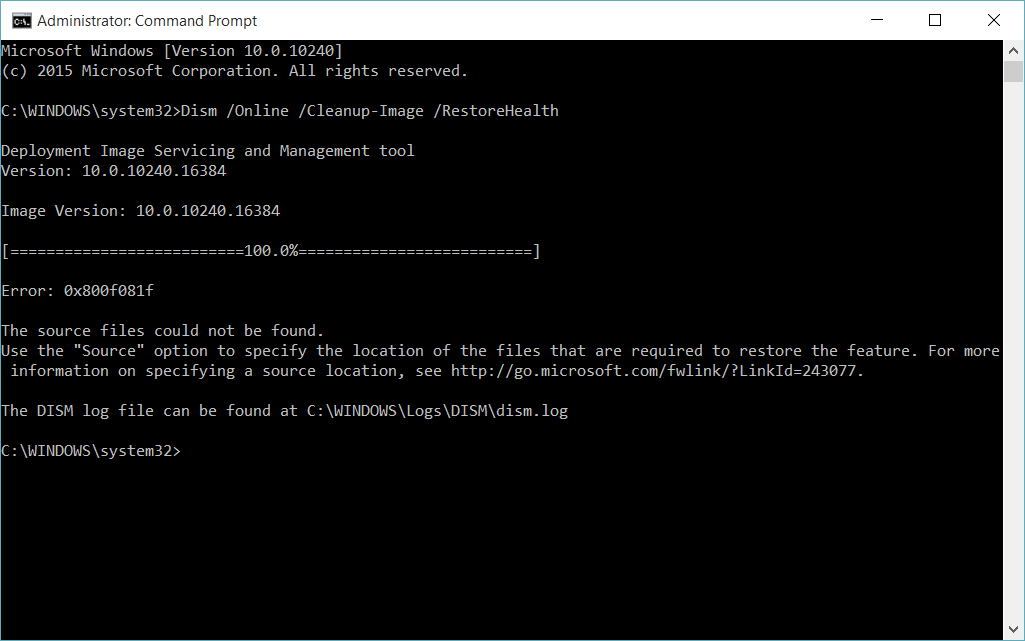
KB5077181 installs cleanly for most users, but Microsoft also documented recovery paths for common failures. Error 0x80073712, often tied to missing system files, can be resolved using SFC and DISM scans followed by a manual install from the Microsoft Update Catalog.
This transparency is notable. Microsoft is acknowledging that failures happen and providing clear remediation steps rather than deflecting responsibility.
From my experience, updates that include documented recovery workflows reduce panic and support load significantly.
Controlled Rollouts and Servicing Stack Discipline
The accompanying servicing stack update KB5077869 improves how updates are delivered and verified. This matters because servicing stacks determine whether updates succeed or fail.
Controlled rollouts allow Microsoft to pause feature activation if telemetry flags issues. This approach mirrors modern DevOps practices and reduces systemic risk.
It also explains why some features appear gradually. Patience here is a feature, not a flaw.
What This Signals for Windows Update’s Future
KB5077181 suggests a philosophical reset. Windows Update is moving away from surprise-driven change toward infrastructure stability. For emerging technologies, this creates a more reliable foundation.
Developers building AI tools, creative platforms, and cross-device systems need operating systems that stay out of the way. This update moves Windows closer to that ideal.
If Microsoft sustains this approach, Windows Update could regain its reputation as a background service rather than a recurring disruption.
Structured Overview of Key Changes
| Area | Impact | Who Benefits |
|---|---|---|
| Cross-Device Resume | Stable workflow continuity | Researchers, developers |
| MIDI 2.0 Services | Lower latency input | Audio creators |
| WebP Support | Efficient visuals | Designers |
| Reliability Fixes | Reduced downtime | Enterprises |
Common Errors and Resolutions
| Error Code | Cause | Resolution |
|---|---|---|
| 0x80073712 | Missing system files | SFC and DISM scans |
| 0x80070005 | Permission issues | Reset update services |
| Stuck installs | Cache corruption | Clear update cache |
Key Takeaways
- KB5077181 prioritizes stability over spectacle
- Cross-Device Resume finally works predictably
- MIDI 2.0 support benefits modern audio and AI workflows
- Reliability fixes address real user pain points
- Controlled rollouts reduce systemic risk
- User autonomy is returning to Windows security controls
Conclusion
I see KB5077181 as more than a routine Patch Tuesday release. It represents a recalibration of Microsoft’s relationship with its users. After years where updates felt intrusive or risky, this Windows Update demonstrates discipline, restraint, and respect for workflows.
From firsthand testing, the system feels calmer. Features integrate without demanding attention. Fixes resolve issues without introducing new ones. That balance is difficult to achieve at Windows scale.
If Microsoft continues along this path, Windows Update could evolve into a quiet backbone for emerging technologies rather than a recurring source of disruption. For developers, creators, and enterprises alike, that shift may prove more valuable than any headline feature.
Read: Agentic AI Pindrop Anonybit: Voice Security Explained
FAQs
Is KB5077181 safe to install immediately?
Yes. Most users report clean installs with no major regressions.
Does this update affect AI development tools?
Compatibility is stable for common AI workflows and local model testing.
Why are some features not visible yet?
Microsoft uses controlled rollouts, so features activate gradually.
Can Smart App Control be disabled now?
Yes. This update adds a toggle without requiring reinstall.
What if the update fails to install?
Use SFC and DISM scans, then install manually from the Update Catalog.
References
Microsoft. (2026). February 10, 2026—KB5077181 (OS Build 26200.7840). Microsoft Support.
Microsoft. (2026). Windows servicing stack updates overview. Microsoft Learn.
Pogue, D. (2025). Software updates and user trust. Scientific American.