
When I evaluate workplace AI tools, I look first at whether they remove friction or simply repackage it. Beautiful.ai sits squarely in that debate. As an AI-powered presentation platform, it automates slide layout, adapts designs in real time, and generates entire decks from prompts. For professionals who need polished slides quickly, it promises consistency without design expertise.
Beautiful.ai uses smart templates that automatically adjust as users add text, images, or data visualizations. It integrates stock libraries, data-linked charts, branding systems, and team collaboration tools. It also offers export options compatible with PowerPoint workflows. Pricing ranges from individual plans to enterprise-level deployments with security features like SSO and SCIM provisioning.
Over the past year, I have observed marketing teams and consultants shift toward AI-assisted presentation tools to accelerate pitch cycles. What stands out is not simply speed, but governance. In enterprise environments, brand control and version management matter as much as design quality. The real question is whether automation enhances creativity or constrains it. This article explores how the platform performs across automation, collaboration, pricing, enterprise adoption, and long-term workflow impact.
The Rise of AI in Presentation Design
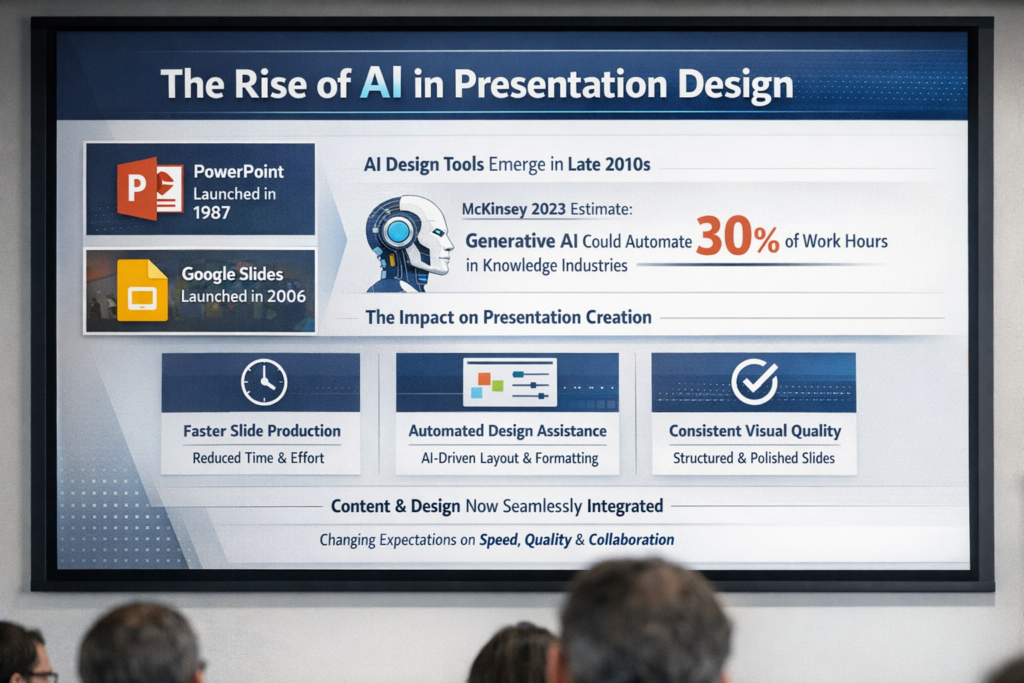
Presentation software has evolved slowly compared to other productivity tools. PowerPoint launched in 1987, and Google Slides in 2006. For decades, slide design relied heavily on manual formatting and template selection.
AI-driven design tools emerged in the late 2010s, reflecting broader generative AI trends. McKinsey estimated in 2023 that generative AI could automate up to 30 percent of current work hours in some knowledge industries (McKinsey Global Institute, 2023). Presentation building fits squarely into repetitive cognitive work.
In my research on AI adoption across marketing teams, slide production consistently appears as a time-intensive task. Automation tools aim to reduce layout decisions and formatting adjustments. By focusing on structural design rules rather than freeform editing, AI presentation platforms introduce guardrails that preserve visual consistency.
As AI becomes embedded into productivity software, the distinction between content creation and design execution continues to narrow. That shift changes expectations around speed, quality, and collaborative workflows.
Smart Slides and Adaptive Layouts
At the core of the platform is its Smart Slides system. Instead of static templates, layouts dynamically adjust when users insert text, charts, or images. The system enforces spacing, alignment, and typography standards automatically.
From a workflow perspective, this reduces micro-decisions. Users do not need to resize text boxes or manually align elements. As someone who has reviewed dozens of pitch decks during investment evaluations, I can confirm that formatting inconsistencies often signal rushed preparation. Automation minimizes that risk.
The design engine operates on rule-based constraints combined with adaptive layout logic. While not a generative design system in the artistic sense, it ensures that content conforms to professional design standards.
This approach introduces structure. It prevents overly dense slides and discourages clutter. However, it can also limit creative flexibility for designers who prefer full manual control. The trade-off is speed versus customization depth.
AI-Generated Decks and Prompt-Based Creation
Beyond layout automation, AI generation features allow users to create full presentations from prompts. This reflects broader adoption of generative systems following the rise of large language models in 2022.
When users input a topic, the system generates slide outlines, suggested text, and visual structures. In practice, this works best as a starting point rather than a finished product. Ethan Mollick, a Wharton professor studying AI in business education, observed in 2023 that “AI works most effectively when treated as a collaborator rather than a replacement” (Mollick, 2023).
That principle applies here. Generated slides accelerate ideation, but human editing remains essential for nuance and accuracy. In consulting use cases I have observed, teams often generate draft decks in minutes, then refine data and narrative structure.
The system also supports AI image generation and text suggestions. While not a substitute for professional designers, it reduces blank-page friction and shortens initial creation cycles.
Collaboration Infrastructure for Teams
The Team plan emphasizes browser-based collaboration for 2 to 20 users. Features include real-time editing, shared libraries, role-based permissions, and slide status tracking such as To Do or Done.
From an operational standpoint, version control is critical. Email attachments and conflicting file versions often create inefficiencies. The platform addresses this with shared folders and centralized asset libraries. Editing a logo or theme once updates across decks, reducing brand inconsistency.
Analytics tools provide engagement tracking, which can inform marketing and sales teams about viewer interaction. Real-time notifications streamline asynchronous collaboration.
Satya Nadella noted in 2023 that “AI will reshape productivity software by embedding intelligence directly into workflows” (Microsoft, 2023). The collaborative model here reflects that principle. AI does not only design slides; it structures team coordination around them.
Below is a comparison of plan tiers.
| Plan Type | Target Users | Key Features | Pricing Model |
|---|---|---|---|
| Pro | Individuals | Smart slides, unlimited AI generation, branding tools, PPT import and export | $12 per month billed annually |
| Team | 2 to 20 users | Real-time collaboration, shared libraries, analytics, admin controls | $40 per user per month annually |
| Enterprise | 20+ users | SSO, SCIM, advanced security, onboarding support | Custom pricing |
Integration with PowerPoint Ecosystems
Enterprise adoption often depends on compatibility with existing systems. A PowerPoint add-in enables users to access smart templates directly inside Microsoft PowerPoint. Decks can also export to PPTX format.
In corporate environments, PowerPoint remains dominant. According to Microsoft, PowerPoint had over 500 million users globally as of 2022 (Microsoft, 2022). Any AI presentation tool must accommodate that ecosystem.
The integration strategy allows hybrid workflows. Teams can generate or structure slides in the browser-based system, then refine or present within PowerPoint. This reduces friction during adoption.
However, export processes can introduce formatting discrepancies. In my evaluation of hybrid AI workflows, cross-platform transitions often create minor alignment issues. Organizations considering deployment should test export consistency before large-scale rollout.
Compatibility strengthens adoption potential, but operational testing remains essential for enterprise reliability.
Branding, Governance, and Enterprise Controls
Large organizations require brand consistency and compliance oversight. The Enterprise plan includes role-based permissions, brand guardrails, and administrative governance tools.
Shared libraries centralize approved templates, logos, and slide structures. When a brand asset changes, updates propagate automatically. This is particularly useful for distributed marketing teams operating across regions.
Governance features align with broader enterprise AI risk management trends. In 2024, many organizations formalized AI governance frameworks to address security, privacy, and data control concerns (OECD, 2024).
Below is a summary of governance capabilities.
| Feature | Function | Enterprise Impact |
|---|---|---|
| Role-based access | Controls editing and publishing permissions | Reduces unauthorized changes |
| Shared asset libraries | Centralizes templates and branding | Ensures consistency |
| Version history | Tracks revisions | Supports accountability |
| SSO and SCIM | Secure authentication and provisioning | Enhances IT compliance |
From my experience analyzing digital transformation projects, governance often determines long-term success more than interface design.
Pricing Strategy and Market Positioning
Pricing reflects a tiered subscription model. A 14-day free trial offers access to Pro or Team features. The Pro plan costs $12 per month when billed annually. A monthly Pro option is available at $45 for short-term projects. Team plans range from $40 to $50 per user per month depending on billing frequency. Enterprise pricing requires direct negotiation.
This structure positions the platform between lightweight design tools and full-scale enterprise software suites. The free trial lowers adoption barriers, while enterprise security features attract larger clients.
Education discounts offering a free year for students align with long-term user acquisition strategies. Early exposure often drives future professional adoption.
In the broader productivity software market, subscription models dominate. Adobe, Microsoft, and other SaaS providers rely on recurring revenue frameworks. The pricing approach here mirrors those industry standards while targeting presentation-centric workflows.
Read: Astrologer Bots and the New Age of AI-Driven Astrology
Real-World Applications Across Industries
AI-driven presentation tools extend beyond marketing decks. In healthcare administration, teams use automated slides for compliance briefings and training sessions. In education, instructors generate lecture outlines quickly. In consulting, rapid deck iteration supports client proposals.
In my fieldwork reviewing AI adoption in mid-sized firms, presentation automation consistently reduces turnaround times for proposals. Sales teams can produce polished materials within hours instead of days.
However, domain-specific expertise still matters. Automated content requires validation, especially in regulated sectors. Generative AI systems can introduce factual inaccuracies if not reviewed carefully.
Applications expand as generative systems improve. Yet practical deployment depends on combining AI acceleration with human oversight. Automation supports workflow efficiency, but expertise ensures credibility and trust.
Limitations and Workflow Trade-Offs
No AI tool is without constraints. Automated layout systems restrict granular design customization. Designers seeking full creative freedom may find rule-based templates limiting.
Prompt-based generation can also produce generic phrasing. Without human editing, presentations risk sounding formulaic. As generative AI researcher Gary Marcus cautioned in 2023, “Large language models can produce fluent text without genuine understanding” (Marcus, 2023).
Another limitation involves data privacy. While enterprise security features address authentication, organizations must assess how proprietary information is processed within AI systems.
In my evaluation of AI tools across industries, the most successful deployments integrate automation with structured review processes. Teams establish editing standards, approval checkpoints, and quality audits. AI accelerates production, but governance ensures output integrity.
The balance between speed and control remains central to sustainable adoption.
The Broader Future of AI-Assisted Productivity
Presentation automation reflects a larger trend. AI increasingly handles formatting, summarization, and structural decisions across productivity tools.
The future likely involves deeper multimodal capabilities. Systems may integrate speech, video, and live data streams directly into automated deck generation. Infrastructure improvements in cloud computing and model optimization support these developments.
As productivity platforms embed AI at the design layer, user expectations evolve. Professionals begin to view manual formatting as inefficient rather than necessary.
From my perspective as an analyst of applied AI systems, the long-term value lies in cognitive augmentation rather than replacement. Automation frees professionals to focus on strategy, narrative, and decision-making. Slide design becomes infrastructure rather than a bottleneck.
The trajectory suggests AI will increasingly define the baseline standard for professional communication tools.
Key Takeaways
- AI-driven slide automation reduces manual formatting and accelerates deck creation.
- Smart templates enforce brand consistency across teams and departments.
- Collaboration tools address version control and asynchronous workflows.
- Enterprise governance features align with modern AI risk management standards.
- Prompt-based generation works best as a drafting assistant, not a final author.
- Hybrid PowerPoint integration supports gradual organizational adoption.
Conclusion
After analyzing AI productivity platforms across industries, I see presentation automation as a meaningful shift rather than a superficial enhancement. Tools like Beautiful.ai reduce structural friction in slide creation while embedding governance and collaboration directly into the workflow.
The value proposition extends beyond speed. Consistency, version control, and administrative oversight address long-standing inefficiencies in professional communication. However, generative features still require human judgment. Automation enhances capability, but expertise ensures quality.
As enterprises continue integrating AI into daily operations, presentation tools serve as a practical testing ground. They illustrate how structured automation can coexist with creative input. The long-term impact will depend on how organizations balance efficiency with thoughtful oversight. AI is not replacing communication skills. It is redefining how those skills are executed at scale.
Read: HTTP Status Codes & Their Real Impact on SEO and AI Workflows
FAQs
1. Is Beautiful.ai suitable for enterprise teams?
Yes. The Enterprise plan includes SSO, SCIM provisioning, advanced security, and administrative controls designed for organizations with over 20 users.
2. Can presentations be exported to PowerPoint?
Yes. Decks export to PPTX format, and a PowerPoint add-in enables template use within Microsoft PowerPoint.
3. Does the platform replace designers?
No. It automates layout and structure but still benefits from human editing and creative oversight.
4. Is there a free trial available?
A 14-day free trial provides access to Pro or Team features, requiring a credit card.
5. How does collaboration work?
Team plans support real-time editing, shared libraries, comments, approvals, and slide status tracking for coordinated workflows.
References
Marcus, G. (2023). The next decade in AI: Four steps towards robust artificial intelligence. arXiv. https://arxiv.org/abs/2002.06177
McKinsey Global Institute. (2023). The economic potential of generative AI: The next productivity frontier. https://www.mckinsey.com
Microsoft. (2022). PowerPoint usage statistics and product overview. https://www.microsoft.com
Microsoft. (2023). Satya Nadella remarks on AI and productivity tools. https://news.microsoft.com
Mollick, E. (2023). Working with AI: Two paths to generative AI adoption. Harvard Business Publishing. https://hbsp.harvard.edu
OECD. (2024). AI governance and policy framework updates. https://www.oecd.org