When organizations began widely deploying virtual desktop infrastructure (VDI), a central challenge quickly emerged: how could IT teams maintain a clean, centrally managed system image while still allowing individual users to install applications and customize their workspace? In many Citrix environments, the answer was the personal vDisk, a technology designed to preserve user-level changes without altering the master desktop image.
In simple terms, a personal vDisk is a separate virtual disk assigned to each virtual desktop instance. It captures application installations, user settings, and system modifications that would normally change the operating system. Instead of writing those changes to the base OS image, the virtualization platform redirects them to the attached personal disk. At runtime, the system merges the base image and the personal disk so the desktop behaves like a fully personalized machine.
During the early 2010s, many enterprise IT teams used this approach when implementing Citrix XenDesktop, now known as Citrix Virtual Apps and Desktops. The technology helped balance two competing priorities: centralized IT management and individual user autonomy.
In my experience analyzing virtualization deployments across enterprise environments, personal vDisk solutions represented a fascinating compromise between rigid pooled desktops and fully persistent machines. They were not perfect, but they addressed a real operational need during a critical phase of VDI adoption.
Today, understanding how the personal vDisk model worked provides valuable insight into how modern desktop virtualization systems evolved and why many organizations have shifted toward newer persistence strategies.
The Origins of Personalization in Virtual Desktop Infrastructure
Early VDI systems were designed around a central principle: manage thousands of desktops through a single standardized image. While this dramatically simplified patching and security management, it introduced a major usability problem. Users often needed to install specialized applications, modify configurations, or maintain unique workflow tools.
Traditional pooled desktops did not allow these changes. Every time a virtual machine restarted, it reverted to the original base image.
The personal vDisk architecture emerged as a hybrid solution. Instead of giving users fully persistent desktops, Citrix engineers created a layered model that separated the operating system from user modifications.
In this model:
- The master image contains the operating system and standard corporate applications.
- The personal vDisk stores user-installed software and system-level changes.
- The hypervisor merges both layers dynamically during runtime.
This design allowed IT administrators to update the master image without overwriting user customizations.
As Citrix documentation from the early XenDesktop releases described it, the technology allowed administrators to “combine the benefits of pooled desktops with persistent personalization.” For large enterprises deploying thousands of virtual desktops, this architecture represented a significant operational breakthrough.
How Personal vDisk Works in Citrix Virtual Apps and Desktops
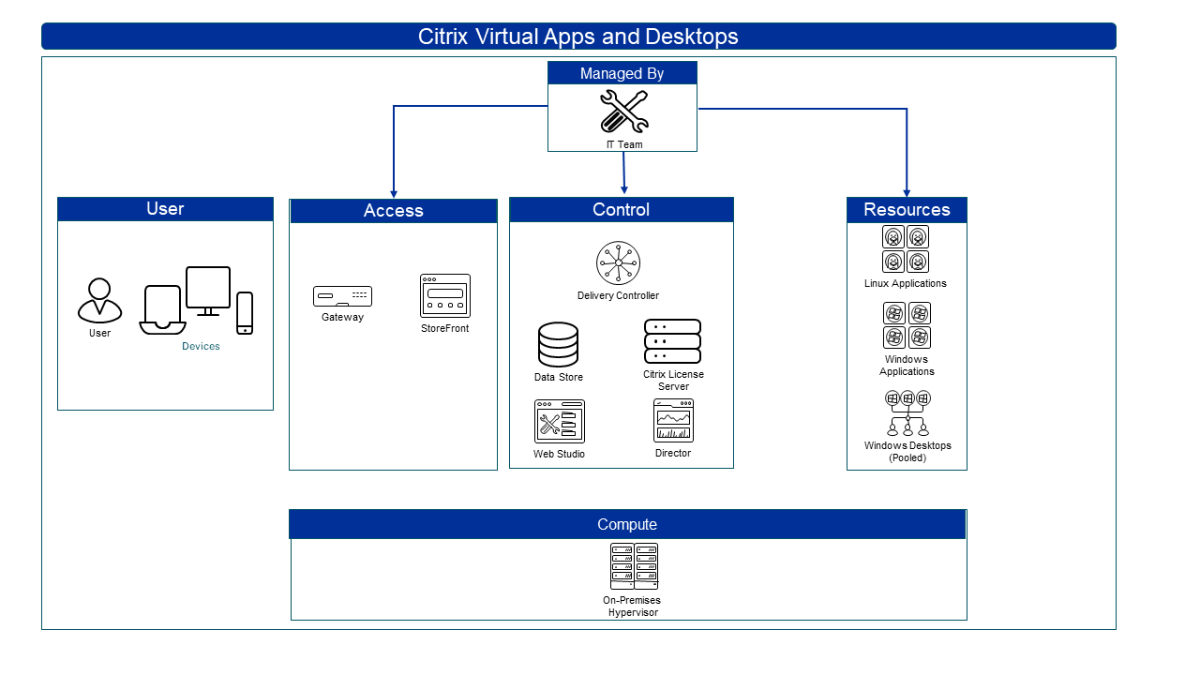
At the core of the system is a relatively straightforward storage architecture. Each virtual desktop receives an additional disk file, typically in VHD format, that acts as the personal layer.
This disk is mounted alongside the main system disk during desktop startup.
Instead of writing changes directly to the OS drive, the system redirects modifications to the personal disk through a virtualization filter driver. The platform then reconstructs a unified filesystem view for the user.
Typical redirection paths include:
- Application installations
- Registry changes
- System configuration modifications
- User-specific software components
This means when a user installs an application into C:\Program Files, the underlying data actually resides in the personal vDisk storage layer.
| Component | Function |
|---|---|
| Master Image | Base OS and standardized corporate applications |
| Personal vDisk | User-installed software and customization layer |
| Hypervisor Storage | Hosts VHD files for each virtual machine |
| Merge Engine | Combines OS and user layers during runtime |
In testing environments I have examined, this layered approach worked surprisingly well for moderate workloads. However, as application complexity increased, the merging process could introduce performance overhead.
Why Enterprises Adopted the Personal vDisk Model
The popularity of personal vDisk deployments during the early 2010s was driven by a set of practical enterprise needs.
Large organizations wanted the operational efficiency of pooled desktops, but they also needed flexibility for power users. Departments such as engineering, research, and finance often relied on niche software that could not be standardized across the organization.
A persistent disk layer solved this problem without sacrificing centralized management.
Three major advantages stood out.
Centralized system updates
Administrators could update the base image once and apply the changes across thousands of desktops.
User-level flexibility
Employees retained the ability to install specialized applications or modify settings.
Reduced image sprawl
Without personal vDisk, IT teams often maintained dozens of separate desktop images for different departments.
As virtualization analyst Brian Madden once observed:
“The biggest challenge in VDI isn’t the technology itself. It’s managing user expectations of a real PC.”
The personal vDisk concept helped bridge that expectation gap.
Architecture Considerations and Storage Design
Deploying personal vDisk environments required careful planning around storage performance and capacity.
Each virtual desktop required an additional disk file, typically ranging from 5 GB to 20 GB depending on the deployment configuration. In large environments with thousands of desktops, this quickly created significant storage requirements.
To address this challenge, many organizations relied on thin provisioning. This allowed storage systems to allocate space dynamically as users consumed disk capacity.
Another important architectural consideration involved I/O patterns.
Because user applications and system modifications were redirected to the personal disk, the workload could become heavily concentrated on the storage subsystem.
| Design Factor | Consideration |
|---|---|
| Disk Size | Typically 10–20 GB per user |
| Storage Type | High-performance SAN or SSD recommended |
| Provisioning | Thin provisioning to reduce capacity waste |
| Backup Strategy | Separate backup policies for personal disks |
In several infrastructure assessments I reviewed over the years, storage bottlenecks often emerged as the primary performance challenge for personal vDisk deployments.
Performance Challenges and Operational Tradeoffs

While the architecture solved many management problems, it introduced new operational complexities.
One issue was the disk merging process. Because the virtual desktop had to reconcile two layers of storage during runtime, heavy I/O activity could slow performance in certain workloads.
Another challenge involved application compatibility. Some applications interacted directly with system components in ways that the redirection mechanism struggled to handle.
Virtualization consultant Gabe Knuth once noted:
“Layered storage models are elegant in theory but complicated in practice, especially when applications behave unpredictably.”
Common operational issues included:
- Disk corruption scenarios
- Storage growth management
- Backup complexity
- Troubleshooting layered file systems
Despite these limitations, the technology remained widely deployed for several years because alternatives were limited.
The Evolution Beyond Personal vDisk
Over time, Citrix and other virtualization vendors developed more advanced approaches to user persistence.
One of the most important developments was application layering. Instead of attaching a single personal disk for all user changes, newer systems separated workloads into multiple layers such as:
- OS layer
- Application layer
- User personalization layer
This architecture made updates more flexible and reduced the performance overhead associated with large personal disks.
Citrix eventually deprecated the personal vDisk feature in favor of newer technologies such as:
- Citrix App Layering
- Profile management solutions
- User environment virtualization tools
Industry analyst Simon Crosby summarized the shift clearly:
“The future of VDI personalization lies in modular layers, not monolithic persistence.”
These newer systems provide the same user flexibility while simplifying management and improving scalability.
Security and Governance Implications
4
Security teams initially had mixed reactions to personal vDisk deployments.
On one hand, the centralized master image remained protected from user changes. This preserved system integrity and allowed rapid security patching.
On the other hand, the personal disk layer created a new space where users could install unapproved software.
In tightly regulated industries such as finance or healthcare, this required stronger governance policies.
Organizations typically implemented controls including:
- application whitelisting
- software inventory scanning
- restricted installation privileges
From a governance perspective, personal vDisk environments illustrated an important principle in enterprise IT: flexibility must always be balanced with control.
Modern Alternatives to Personal vDisk

Today, most modern virtual desktop deployments rely on different persistence strategies.
Instead of storing all changes in a single disk, modern systems distribute user data across several technologies:
- profile containers
- cloud storage
- application layering
- workspace orchestration platforms
These approaches provide more flexibility while reducing storage complexity.
| Approach | Key Benefit |
|---|---|
| Profile Containers | Faster login performance |
| Application Layering | Modular application management |
| Cloud Workspace Platforms | Centralized identity-driven desktops |
| Desktop-as-a-Service | Reduced infrastructure overhead |
The industry shift toward cloud-hosted virtual desktops has also reduced reliance on traditional on-premise disk layering techniques.
Lessons from the Personal vDisk Era
Looking back, the personal vDisk model represents an important step in the evolution of desktop virtualization.
It highlighted a fundamental tension in enterprise computing: organizations want both centralized control and individual flexibility.
While the technology eventually gave way to more advanced systems, the underlying problem remains relevant today.
In conversations with infrastructure architects over the years, I have often heard the same reflection: the most successful virtualization environments are the ones that minimize friction for both administrators and users.
The personal vDisk solution was not perfect, but it pushed the industry toward better approaches for balancing standardization and personalization.
Key Takeaways
- Personal vDisk technology allowed users to install applications without altering the central desktop image.
- The system used a layered storage model that merged user changes with a master OS image.
- Enterprises adopted it widely during early VDI deployments using Citrix XenDesktop.
- Storage performance and management complexity were common operational challenges.
- Modern virtualization platforms now use application layering and profile containers instead.
- The concept highlighted the long-standing tradeoff between centralized IT control and user customization.
Conclusion
The history of personal vDisk technology reveals an important chapter in the evolution of enterprise desktop virtualization. At a time when organizations were rapidly adopting virtual desktop infrastructure, IT teams faced a difficult challenge: delivering standardized systems without sacrificing the flexibility users expected from traditional computers.
By separating the base operating system from user-installed applications and customizations, personal vDisk systems offered a practical compromise. They enabled centralized image management while preserving individual user environments, making large-scale VDI deployments far more viable.
However, the architecture also revealed limitations. Storage overhead, performance considerations, and operational complexity eventually pushed the industry toward more modular solutions. Technologies such as application layering, user profile containers, and cloud-hosted desktops now provide more scalable approaches to the same problem.
Even though many organizations no longer deploy personal vDisk systems today, the design principles behind them continue to influence modern virtualization strategies. Understanding how these systems worked helps explain why today’s desktop environments increasingly rely on layered architectures, cloud storage, and identity-driven workspace platforms.
Read: AnonVault and the Quiet Rise of Anonymous File Storage
FAQs
What is a personal vDisk in Citrix?
A personal vDisk is a virtual disk attached to each virtual desktop that stores user-installed applications and system changes separately from the master operating system image.
Why was personal vDisk used in VDI environments?
It allowed organizations to maintain a standardized system image while still giving users the ability to install software and personalize their desktop environment.
Is personal vDisk still supported in modern Citrix deployments?
Citrix deprecated the feature in favor of newer technologies such as Citrix App Layering and profile management systems.
What were the main drawbacks of personal vDisk?
Common challenges included storage overhead, performance bottlenecks, and complexity when troubleshooting layered disk environments.
What replaced personal vDisk in modern virtualization?
Modern alternatives include application layering, profile containers, and cloud-based desktop platforms that separate user data from system images more efficiently.